Overview
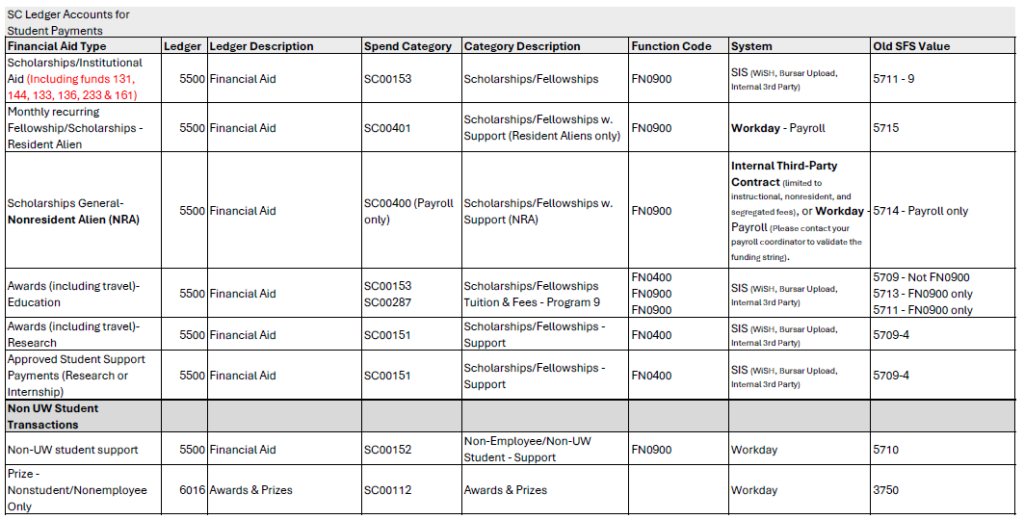
Student award payments, which are payments to students NOT tied to services rendered or prizes for contests and competitions open to the public, were previously paid using Payment to Individual Report forms (PIR). CALS Business Services has developed the Student Award Payment Form to replace PIRs when processing payments to students. Previously account code 3750, prizes and awards, was used for student award payments, however new guidance from the Bursar’s Office and Accounting Services is to use account code 5711, program code 9 (academic related scholarships) or 5709, program code 4 (research related payments) when processing student award payments.
- Use this form to submit student award payments to CALS Business Services for processing (instructions below).
- Use this guide when determining how to pay a student based on the description of the payment being made.
- This CALS-specific student travel handout can help determine whether reimbursement, P-card, or a student travel award is the appropriate method of payment.
- If you are unsure of how to pay a student, the Student Payment Tool can help guide you.
General Information
- Department financial personnel should complete the CALS Student Payment form.
- Recipients must be UW-Madison students and be enrolled in the applicable term (i.e. Spring 2026).
- If a student is not enrolled, please contact Alan Avila to discuss alternative payment options.
- If the student is a Non-Resident Alien (NRA), complete the NRA Scholarship Spreadsheet and email it to glacier@ohr.wisc.edu for processing. This documentation will need to be included with the CALS Student Payment form and award documentation, as payments to NRAs will be made through payroll.
- Welcome Checks are now processed using the same CALS Student Payment form.
Detailed Instructions
- Select whether the student is a graduate student or an undergraduate student
- Select whether the student is a resident/resident alien or a non-resident alien
- Please remember that payments to NRA students must be made through payroll
- Fill in the student’s last name, first name and middle initial
- Enter the student’s Campus ID or Student Information System ID (SIS ID)
- Do NOT provide a student’s Social Security Number
- The SIS ID is different than a student’s campus ID, which typically begins with 9 and is also ten digits
- Enter the amount of the scholarship and the related funding string(s)
- Enter the term (i.e. Spring 2026)
- If a student is NOT enrolled in that semester, please contact Alan Avila to discuss alternative payment options
- Enter the program name (i.e. Annual Department Scholarship)
- Describe the student payment in detail
- Example: Student won a poster contest that was only open to UW-Madison students
- Attach documentation describing the award (award letter, website announcement, email notifications, etc.)
- Obtain an authorized Department Chair or alternate signature
- Route the signed form electronically to Tissa Jojo Thottan and Dave Stange
- Please include the Department Cost Center and student name in the email subject line (i.e. Student Award Payment, Jane Smith, CC003108)
Scholarship Ledger and Spend Categories